
Creating music has never been more accessible than it is today! In 2025, beat makers have revolutionized how we produce music, allowing anyone with a creative spark to craft professional-sounding tracks without expensive studio equipment.
Did you know that over 68% of chart-topping hits in the past year were produced using digital beat making software?
After years of frustration with complicated and expensive music production tools, I decided to create Beat Maker – a completely free, browser-based solution that delivers professional results without the steep learning curve.
Whether you’re a beginner just starting out or an experienced producer looking for a streamlined workflow, Beat Maker brings studio-quality beat creation to your browser with zero downloads required!
What is a Beat Maker and Why Use One?
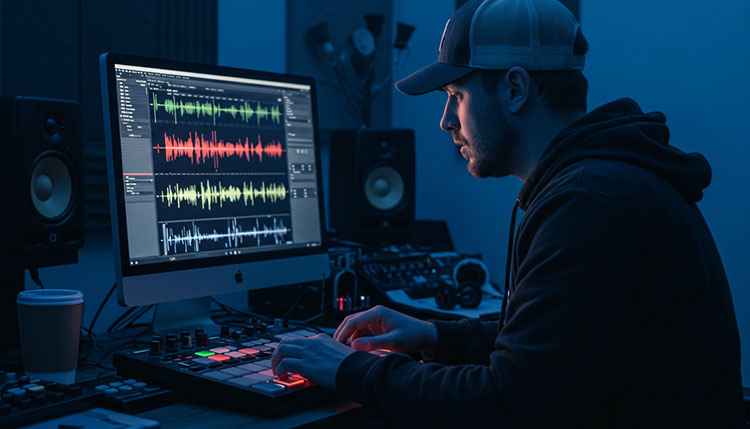
A beat maker is essentially digital software that lets you create rhythmic patterns and musical compositions without traditional instruments.
These nifty tools have completely changed the game for aspiring producers who don’t have access to fancy equipment or formal training.
Think of beat makers as your personal rhythm laboratory – you get to experiment with sounds, patterns, and textures until you craft something that slaps.
Unlike full-fledged Digital Audio Workstations (DAWs) like Pro Tools or Logic, which can be overwhelming for beginners, beat makers focus specifically on rhythm creation and pattern sequencing.
Drum machines, on the other hand, are more limited and typically only provide percussion sounds, while beat makers offer a broader palette of musical elements.
The beauty of modern beat making software is that it democratizes music production in ways that were unimaginable just a decade ago.
Here’s why beat makers have become essential tools for music creators:
- Accessibility: Create music anywhere with just a computer or even a smartphone
- Cost-effectiveness: Professional-quality production without dropping thousands on hardware
- Rapid workflow: Generate ideas quickly without technical hurdles slowing you down
- Low learning curve: Start making decent beats within minutes, not months
- Portability: Work on your music at home, in coffee shops, or while traveling
Everyone from teenage bedroom producers to grammy-winning artists now relies on beat makers for at least part of their creative process.
Beginners love them because they provide immediate gratification – you can create something that sounds professionally produced even if you’ve never touched music software before.
Songwriters use beat makers to quickly sketch out rhythmic ideas that complement their lyrics, without getting bogged down in complex production techniques.
Even professional producers often start with beat makers to lay down the foundational groove of a track before moving to more comprehensive production environments.
This accessibility revolution has completely reshuffled the deck in the music industry.
Artists who would have been gatekept out of music production due to economic barriers can now create radio-ready tracks from their bedrooms.
The explosion of indie artists climbing the charts in recent years is direct evidence of how beat makers have leveled the playing field.
Remember when you needed an expensive studio booking just to record a decent demo? Those days are long gone, and beat makers deserve much of the credit for this shift.
Beat Maker: The Ultimate Free Online Music Production Tool
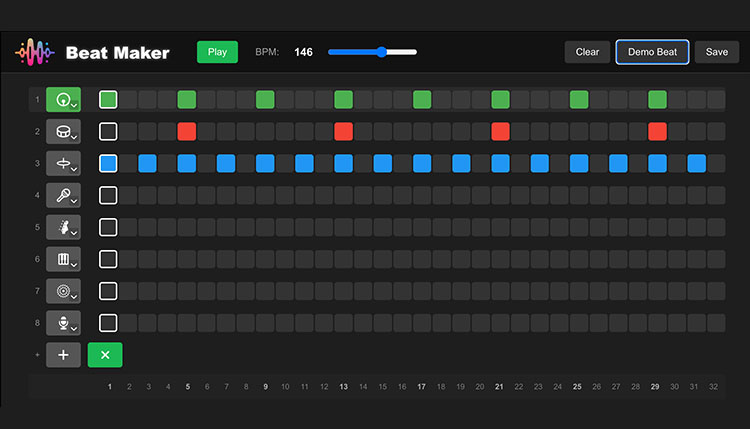
Beat Maker stands out in the crowded digital music production landscape as a completely free online solution that doesn’t sacrifice professional features.
No downloads, no installations, and absolutely zero subscription fees – just open your browser and you’re ready to create.
The heart of Beat Maker is its powerful 32-Step Sequencer Grid, arranged in a user-friendly 4×8 layout that strikes the perfect balance between simplicity and flexibility.
This isn’t your basic cookie-cutter grid – you can drag and drop sounds with pinpoint precision, while visual step indicators keep you locked into the rhythm effortlessly.
Pattern chaining lets you string together different sequences to create complete arrangements, essentially turning simple beats into fully-realized songs.
Each track comes with its own individual controls, giving you studio-quality customization without the intimidating interface of professional DAWs.
The sample library absolutely slaps – it’s packed with professionally recorded sounds from respected audio company Echo Sound Works.
You’ll find everything you need organized into intuitive categories:
- Punchy 808s that deliver that chest-thumping low end
- Crisp claps that cut through any mix
- Atmospheric FX to add texture and interest
- Hi-hats ranging from tight and clean to loose and dirty
- Kicks that range from boomy trap sounds to tight electronic thumps
- Unique percussion elements to add character to your beats
- Snappy snares that provide the backbone of your rhythm section
- Rich synths for melodic elements and bass lines
- Vocal samples to add the human element to your productions
Each sample displays a visual waveform, so you can literally see the sound before you hear it – a game-changer for efficient workflow.
Metadata for each sample, including BPM, key, and creator info, means you never have to guess which sounds will work together.
One-click preview functionality lets you audition sounds instantly, cutting down on the frustrating trial-and-error process that plagues other beat makers.
The audio engine under the hood is seriously impressive for a browser-based tool.
BPM control ranges from a laid-back 60 to a frenetic 200, covering everything from downtempo chill beats to hyperactive drum & bass.
Each pad gets its own dedicated volume slider, allowing for precise mixing directly in the beat maker environment.
Panning controls give you the ability to create spacious, professional-sounding mixes with proper stereo imaging – a feature often missing from free beat makers.
The real-time audio processing leverages the Web Audio API to deliver surprisingly low latency, even with multiple tracks playing simultaneously.
The user interface deserves special mention for striking that elusive balance between power and simplicity.
The categorized sidebar with expandable sections keeps your workspace clean while giving you instant access to all your sounds.
The search and filtering system means you’ll never waste time scrolling through endless samples to find that perfect sound.
Color-coding throughout the interface provides visual cues that speed up your workflow – regular users develop an almost subconscious color association that makes beat creation lightning-fast.
The favorites system uses local storage to remember your go-to sounds between sessions, essentially allowing you to build your personal drum kit over time.
Keyboard ninjas will appreciate the thoughtful shortcuts that eliminate unnecessary clicking:
- Space bar toggles play/stop
- C key instantly clears the current pattern
- Number keys 1-8 select corresponding tracks
- Plus/minus keys adjust BPM on the fly
The pattern saving and loading system means you never lose your creative work, even though everything runs in your browser.
Behind all this functionality is a meticulously crafted user experience that makes beat creation feel less like operating software and more like playing an instrument.
Top Free Beat Makers in 2025
The landscape of free beat making software has undergone a serious glow-up in recent years, with options that rival premium packages in both quality and functionality.
Today’s free beat makers aren’t the stripped-down, feature-starved programs of yesteryear – they’re legitimate production powerhouses.
This revolution has been driven by a combination of open-source development, browser-based technologies, and companies using free tiers to funnel users toward premium offerings.
The real winners in this scenario are music producers, who now have access to studio-quality tools without spending a dime.
Among the current crop of free options, several stand out for their exceptional performance and feature sets.
GarageBand remains the gateway drug for many aspiring producers, especially in the Apple ecosystem, offering surprising depth beneath its accessible interface.
LMMS (Linux MultiMedia Studio) delivers cross-platform functionality with a comprehensive feature set that rivals paid options like FL Studio.
Cakewalk by BandLab deserves special mention as a formerly premium DAW that’s now completely free, offering professional-grade tools that would have cost hundreds just a few years ago.
SoundBridge stands out for its clean, modern interface and impressive performance even on modest hardware.
What separates these standouts from the pack are their robust feature sets that don’t feel compromised despite their zero-dollar price tag:
- Extensive sound libraries with thousands of usable samples
- Multiple editing views for different workflow preferences
- Flexible export options including MP3, WAV, and even stems
- Plugin support for expanding functionality
- Regular updates that add new features and fix bugs
Users consistently rave about how these free options have transformed their production capabilities.
Of course, free beat making software does come with certain limitations compared to their paid counterparts.
Most free options cap the number of simultaneous tracks or limit access to certain advanced effects.
Export restrictions are common, with some free beat makers limiting output quality or adding watermarks.
Plugin support tends to be more limited in free versions, restricting your sound design possibilities.
These limitations make free beat makers particularly well-suited for beginners who are still learning the fundamentals of production.
Hobby producers who create music for personal enjoyment rather than professional release also find free options more than adequate for their needs.
Beat making teachers often recommend starting with free software to master the basics before investing in premium packages.
Even with these considerations, the gap between free and paid options continues to narrow each year, making the decision to upgrade increasingly difficult to justify for many producers.
The democratization of music production through free beat makers has directly contributed to the explosion of independent artists achieving commercial success without traditional industry backing.
Premium Beat Maker Software Worth the Investment
While free options have come a long way, premium beat making software still offers distinct advantages for serious producers willing to invest in their craft.
These paid solutions push the boundaries of what’s possible in digital music production, offering features that can take your beats from good to mind-blowing.
The industry’s heavy hitters each bring something unique to the table, catering to different production styles and workflow preferences.
FL Studio has maintained its legendary status among beat makers for its pattern-based workflow that feels intuitive for electronic and hip-hop production.
Ableton Live’s session view revolutionized how producers approach arrangement, making it a favorite among performers and experimental producers.
Logic Pro delivers exceptional value within the Apple ecosystem, offering professional features at a relatively modest one-time price.
Bitwig Studio has earned devoted fans for its innovative modulation system and rock-solid performance.
Maschine combines hardware and software in a package that bridges the gap between traditional MPC-style workflow and modern production techniques.
When comparing these premium options, costs vary significantly:
- Entry-level packages typically range from $99-199
- Mid-tier options with expanded features cost $200-399
- Complete production suites can run $400-799
- Subscription models average $10-30 monthly
- Hardware/software combinations start around $300 and can exceed $1,200
The value equation depends entirely on your specific needs and how you’ll use the software.
These premium packages unlock advanced capabilities that serious producers eventually crave:
Comprehensive mixing and mastering tools that deliver radio-ready results directly in your beat making software.
Advanced automation features allow for complex, evolving sounds that bring static beats to life.
Deep sampling capabilities let you create custom instruments from any recorded sound.
Algorithmic composition tools can generate musical ideas when you’re stuck in a creative rut.
Professional-grade synthesis engines provide unlimited sound design possibilities beyond preset libraries.
Integration with outboard gear and analog equipment bridges the digital and physical worlds for hybrid setups.
Surround sound and spatial audio support prepares your music for emerging platforms beyond stereo.
Each premium option tends to attract a specific type of music creator.
Professional producers working on commercial projects typically gravitate toward the most comprehensive solutions that can handle every stage from composition to final delivery.
Electronic music specialists often prefer software with deep synthesis and sound design capabilities.
Hip-hop producers frequently choose options with extensive sampling tools and pattern-based workflows.
Film and game composers need the extensibility and synchronization features found in high-end packages.
Live performers require stability and flexible performance features above all else.
When considering the return on investment for premium beat making software, several factors come into play.
If you’re earning income from your music, professional tools often pay for themselves through increased productivity and output quality.
The time saved with efficient workflows in premium software can be substantial – often hundreds of hours annually for active producers.
Many paid options offer free lifetime updates, spreading the initial investment across years of use and continuous improvement.
The learning curve associated with premium software represents its own investment, creating a valuable skill set that transfers to professional settings.
Community support and resources tend to be more robust around industry-standard paid software, providing unofficial added value through tutorials, presets, and troubleshooting assistance.
Beat Maker Features to Look For
Navigating the feature sets of different beat makers can feel like deciphering hieroglyphics if you don’t know what actually matters for your music.
Not all features contribute equally to your production capabilities, and some seemingly minor tools can dramatically impact your creative process.
Understanding which features align with your production style helps cut through the marketing hype and focus on what will genuinely improve your beats.
Every decent beat maker should include these foundational elements:
- An intuitive sequencer grid for programming patterns
- Basic mixing capabilities including volume and panning
- A usable sound library covering essential drum and instrument sounds
- Pattern chaining or basic arrangement tools
- Stability and reliability (nothing kills creativity faster than crashes)
- Standard audio export options (at minimum, WAV or MP3)
- Reasonable system requirements that work on average computers
Beyond these basics, several advanced features separate professional-grade beat makers from entry-level options.
Advanced sidechaining capabilities allow for that pumping effect heard in modern dance music and create space in busy mixes.
Flexible routing options let you process sounds in parallel or create complex signal chains for unique textures.
Groove templates and humanization features add natural feel to programmed beats, removing the mechanical precision that can make digital production sound sterile.
Time-stretching and pitch-shifting tools enable creative sample manipulation without compromising quality.
Parameter automation lets you create evolving, dynamic sounds that change over time rather than static loops.
MIDI effects and tools expand your programming capabilities beyond basic note input.
The quality and expandability of the included sound library can make or break your experience with a beat maker.
Look for well-recorded, cleanly edited samples that don’t require extensive processing to sound professional.
Categorization and tagging systems save countless hours when searching for specific sounds.
Library expansion options ensure you won’t outgrow the included sounds as your productions evolve.
Format compatibility with popular sample packs allows you to incorporate sounds from other sources.
Velocity layers and round-robin sampling create more realistic and expressive instrument sounds.
The user interface significantly impacts how quickly you can translate ideas from your head to your speakers.
- Clean, uncluttered layouts minimize distractions during creative phases
- Customizable views accommodate different production styles and preferences
- Logical grouping of related functions speeds up common workflows
- Keyboard shortcuts reduce reliance on mouse navigation
- Scalable interfaces work across different screen sizes and resolutions
The learning curve varies dramatically between different beat makers, with some prioritizing immediate accessibility while others offer deeper control at the cost of complexity.
Beginners typically benefit from software with contextual help, interactive tutorials, and simplified interfaces.
Experienced producers often prioritize depth and customization over immediate accessibility.
Don’t sleep on the importance of export and sharing capabilities, which determine how your music reaches your audience.
High-quality export options preserve the fidelity of your productions across platforms.
Stem export allows for flexible remixing and collaboration with other producers.
Direct uploading to streaming services or social platforms simplifies the distribution process.
Collaboration features enable real-time or asynchronous work with other musicians regardless of location.
Cross-platform compatibility becomes increasingly important as your production setup evolves.
Software that works across operating systems prevents lock-in to specific hardware ecosystems.
Mobile companion apps extend your workflow beyond the studio environment.
Cloud synchronization keeps your projects and sounds consistent across multiple workstations.
Futureproofing your beat maker choice involves considering the developer’s track record for updates and support.
How to Choose the Right Beat Maker for Your Needs
Selecting the ideal beat maker isn’t about finding the “best” software – it’s about finding the best match for your specific situation.
The perfect beat maker for a touring DJ might be completely wrong for a bedroom producer just starting their journey.
Your skill level plays a crucial role in determining which beat maker will accelerate rather than hinder your creative growth.
Complete beginners generally thrive with streamlined interfaces that provide immediate gratification without overwhelming technical complexity.
Intermediate producers benefit from software that gradually reveals more advanced features as their skills develop.
Advanced users typically prioritize customization and depth over hand-holding, preferring tools that can be molded to their established workflows.
Your production goals should directly influence your beat maker selection:
- Creating beats primarily for fun and personal enjoyment? Simplicity and immediate inspiration matter most
- Developing a portfolio to showcase your production skills? Look for industry-standard software that demonstrates relevant proficiency
- Producing commercial releases? Prioritize professional output quality and reliable performance
- Performing live? Real-time manipulation capabilities and stability become essential
- Teaching others? Choose software with clear visual feedback and intuitive processes
Budget considerations extend beyond the initial price tag to include potential expansion costs.
Free options often require paid expansion packs to unlock their full potential.
Some affordable programs demand frequent upgrades or subscription renewals, costing more in the long run than software with higher upfront costs but free lifetime updates.
Hardware requirements can add significant costs if your current computer needs upgrading to run more demanding software smoothly.
Different musical genres often benefit from beat makers with specialized capabilities.
Hip-hop production typically thrives with software offering strong sampling tools and pattern-based workflows.
Electronic dance music benefits from beat makers with advanced synthesis and automation capabilities.
Lo-fi and experimental genres often leverage software with creative audio manipulation and degradation effects.
Pop production frequently requires extensive virtual instrument libraries and professionally-designed presets.
Rock and acoustic-leaning genres benefit from beat makers with superior audio recording capabilities alongside programming tools.
Hardware compatibility becomes crucial if you already own controllers, keyboards, or other music equipment.
Native integration with specific hardware controllers can dramatically improve your hands-on experience.
MIDI implementation quality varies significantly between different software, affecting how responsive external controllers feel.
Audio interface compatibility impacts recording quality and reliability.
Driver stability across different operating systems can make or break your experience when using specialized hardware.
Future-proofing your choice involves considering the software developer’s reputation and trajectory:
Look for regular update schedules that demonstrate ongoing development commitment.
A large user base generally ensures continued support and a wealth of learning resources.
Companies with diverse product lines tend to be more financially stable, reducing the risk of abandoned software.
Upgrade policies affect long-term costs and access to new features.
Community support provides an informal safety net for troubleshooting and learning.
Ultimately, the “right” beat maker creates the least friction between your musical ideas and their realization – all other factors are secondary to this fundamental requirement.
Getting Started: Tips for Beat Making Beginners
Starting your beat making journey can feel overwhelming with all the buttons, knobs, and technical jargon thrown at you.
The good news? You only need to understand a handful of concepts to start creating decent beats right away.
Let’s break down the essential terminology that will help you navigate any beat maker with confidence.
A pattern is simply a short musical phrase, typically 1-4 bars long, that forms the building block of your beats.
Sequencing refers to the process of arranging notes or sounds in a specific order along a timeline.
BPM (Beats Per Minute) controls the tempo of your beat – higher numbers create faster tracks, lower numbers produce slower vibes.
Quantization automatically aligns your notes to a rhythmic grid, fixing minor timing issues for cleaner-sounding beats.
Samples are pre-recorded sounds that you can trigger and manipulate within your beat maker.
MIDI is essentially digital musical information – not audio itself, but instructions that tell your software which notes to play and how to play them.
When first opening your beat maker of choice, follow these steps for the smoothest onboarding experience:
- Start with a simple drum pattern using just kick and snare to establish rhythm
- Add hi-hats and percussion elements to create movement and energy
- Incorporate a simple bass line using basic notes from a scale
- Experiment with one melodic element like a piano or synth
- Learn to use volume controls to create a balanced mix
- Save your work frequently to avoid losing creative ideas
- Export your beat and listen on different devices to check how it translates
Beginners consistently fall into several common traps that can be easily avoided with awareness.
Overcomplicating beats with too many elements leads to muddy, cluttered compositions – great beats often have just 5-7 core elements.
Neglecting proper gain staging (volume management) results in distorted or imbalanced mixes.
Excessive focus on finding “perfect” sounds can lead to endless browsing instead of actual music creation.
Using too many effects without understanding their purpose creates unfocused, amateur-sounding productions.
Skipping basic music theory results in harmonically clashing elements that never quite sound “right” together.
Fortunately, the beat making community offers abundant resources for accelerating your learning curve.
YouTube tutorials provide visual, step-by-step guidance for specific techniques and software.
Reddit communities like r/beatmaking and r/makinghiphop offer feedback and advice from fellow producers at all skill levels.
Free online courses from platforms like Coursera and Skillshare teach structured production fundamentals.
Software-specific forums provide troubleshooting and tips directly relevant to your chosen beat maker.
Discord communities enable real-time questions and collaboration with other producers.
Structured learning progresses most efficiently when you tackle increasingly complex projects.
Start by recreating simple beats from your favorite tracks to develop basic sequencing skills.
Challenge yourself to create complete 16-bar loops with transitions and basic arrangement ideas.
Practice “genre studies” where you analyze and reproduce the defining characteristics of different musical styles.
Experiment with remixing existing tracks to understand how different elements interact.
Participate in beat battles or challenges that push you to create within specific constraints.
Remember that every professional producer started exactly where you are now – confused, overwhelmed, but excited by the possibilities.
The difference between those who develop their skills and those who quit lies primarily in consistent practice and curiosity, not natural talent or expensive equipment.
Advanced Beat Making Techniques
Once you’ve mastered the fundamentals, a whole world of advanced techniques opens up to elevate your beats from basic to professional.
These approaches separate cookie-cutter productions from tracks that capture attention and emotion.
The journey from intermediate to advanced production often involves shifting focus from “how to use the software” to “how to create distinctive artistic expressions.”
Layering sounds strategically creates depth and character that single samples rarely achieve on their own.
Try combining a sharp, transient-rich kick with a subby, sustained kick to create a hybrid that delivers both punch and power.
Layer multiple snares with complementary characteristics – one for the crack, another for body, and perhaps a clap for texture.
Use subtle choir or atmospheric samples behind lead elements to create dimensional space without cluttering the mix.
Sound design within beat makers opens up unlimited sonic possibilities beyond stock sounds:
- Resampling techniques like recording and manipulating your own patterns
- Creative use of filters to sculpt frequency content over time
- Modulation effects that create movement and evolution in static sounds
- Granular processing to transform ordinary samples into otherworldly textures
- Experimental recording techniques to create truly unique starting materials
- Circuit-bending virtual instruments to produce glitchy, unpredictable results
Mixing directly within your beat maker requires understanding several key principles.
Frequency separation ensures each element occupies its own spectral space without fighting other sounds.
Dynamic processing through compression shapes the envelope and perceived volume of sounds for better cohesion.
Stereo imaging techniques create immersive width while maintaining mix stability.
Parallel processing allows you to blend extreme effect treatments with clean signals for powerful hybrid sounds.
Automation of effects parameters creates evolving textures that maintain listener interest throughout repetitive sections.
Creative workflow approaches can break you out of formulaic production habits.
Try the “subtractive arrangement” technique – start by throwing everything into your beat, then remove elements until only the essential components remain.
Implement “forced limitations” by restricting yourself to a small number of sounds or a specific sample pack to encourage deeper exploration of each element.
Practice “sound substitution” by replacing conventional elements with unexpected alternatives – like using a processed door slam instead of a snare drum.
Experiment with unusual time signatures beyond standard 4/4 to create distinctive rhythmic personalities.
Incorporate microrhythms and subtle timing fluctuations that create human feel without sacrificing tightness.
Professional beat makers consistently emphasize certain industry standards worth adopting.
Gain staging throughout the production process maintains optimal signal levels and prevents digital clipping.
Reference tracks provide calibration points for comparing your mix decisions against commercial releases.
Strategic use of headroom leaves space for mastering without squashing dynamics.
Session organization with clear labeling and color-coding prevents chaos in complex projects.
Regular bouncing of complex elements to audio preserves CPU resources and commits you to decisions.
Even with advanced techniques, simplicity often yields the most powerful results.
The space between notes – the strategic use of silence – often impacts listeners more than adding another layer.
A single distinctive element with character often outperforms multiple competing sounds fighting for attention.
Emotion and groove consistently trump technical perfection in creating memorable beats.
Advanced beat making isn’t necessarily about complexity – it’s about making deliberate choices that serve your musical vision rather than following formulaic patterns.
Conclusion
Beat makers have transformed music production, making it possible for anyone to create professional-sounding tracks without expensive equipment or extensive training.
Beat Maker stands at the forefront of this revolution, offering a completely free, browser-based solution that delivers professional-grade features without compromises.
With its intuitive 32-step sequencer, premium sample library from Echo Sound Works, and advanced audio features, Beat Maker eliminates the barriers between inspiration and creation.
Ready to make your first beat? Simply open Beat Maker in your browser, no download required, and you’ll be amazed at what you can create in minutes. J
oin thousands of producers who’ve already discovered that professional music production doesn’t need to be complicated or expensive!
The journey from curious beginner to confident producer is more accessible today than at any point in history.
Whether you’re creating beats for personal enjoyment, aspiring to professional production, or somewhere in between, today’s beat making tools provide unprecedented creative freedom.
The techniques and approaches we’ve explored are starting points rather than rigid rules – the most exciting productions often come from producers who understand conventions but aren’t afraid to break them.
As you develop your own production style, remember that your unique perspective and creative choices matter more than technical perfection or following trends.
Your beats don’t need to sound like everyone else’s to be valid and valuable expressions of your musical ideas.
The beat making community continues to grow more supportive and inclusive every year, with producers at all levels sharing knowledge, feedback, and encouragement.
Don’t hesitate to customize the information from this guide to fit your specific musical goals and production style.
Some approaches will resonate with your workflow while others might not – that’s completely normal and part of developing your personal production fingerprint.
Experiment freely, learn continuously, and most importantly, enjoy the process of bringing your musical ideas to life.
The ability to transform the sounds in your head into shareable experiences is a genuine superpower – one that’s now available to anyone with a computer and the curiosity to explore beat making.
Your next great beat is just a browser tab away – what are you waiting for?